DeepSeek Harness Explained: What dsh Is, How It Works, and What Is Still Rough
DeepSeek made the deepseek-ai/deepseek-harness repository public on 13 August 2026 under an MIT licence. It passed a hundred thousand GitHub stars within two days, and most of what got written about it in that first week was the install command and a screenshot.
This post is a read of the source and the architecture documents. The aim is to explain what the software actually does in language that does not assume you already build agents for a living. Where a term is jargon, it gets defined the first time it appears.
What an agent runtime is
Start with the thing the word describes, because the word itself explains nothing.
A language model on its own can only read text and produce text. It cannot open a file, run a command, or search the web. To do any of that, something else has to sit around the model, offer it a list of actions it is allowed to take, carry out whichever action it picks, and hand the result back so the model can decide what to do next. That loop repeats until the job is done.
The software that runs that loop is the agent runtime. It is sometimes called the harness, which is where this project gets its name. When you use a coding assistant that can edit your files and run your tests, roughly half of what you are using is the model and the other half is the runtime around it.
DeepSeek Harness is that second half, published on its own, with the model left as a setting you choose.
Getting it running
The command is dsh, and one line starts it.
npx @deepseek-ai/dsh webThat opens a web interface on 127.0.0.1:3080, which is your own machine and nowhere else.
There are other ways in. A terminal interface for people who prefer the command line. A headless runner, meaning one with no interface at all, for scripts and continuous integration pipelines. An entry point over ACP and JSON-RPC, which are two standard ways for one program to call another, so other software can drive the agent directly. And software development kits in both Python and TypeScript, so you can build the agent into your own application.
All of these share the same core behaviour and produce the same session events. The only difference between them is which set of components gets assembled when the process starts.
The detail worth pausing on is that despite the name, the harness is not tied to DeepSeek models. You point it at whichever provider you want. For a company that sells models, publishing the surrounding software and leaving the model slot open is a deliberate decision, not an oversight.
What everything is a plugin actually means
Most software has a core that you are not supposed to touch, surrounded by extension points where you are allowed to add things. A plugin in that world is a guest in someone else’s house.
DeepSeek Harness does not work that way, and the phrase in the documentation is meant literally. A plugin here is simply a package that registers itself when the program starts. The piece that talks to the model is one. The list of tools the model can use is one. The session log is one. The sandbox is one. The agent loop itself, the part that decides what happens next, is one.
There are more than 230 of these packages in the repository. Reading and writing files, running shell commands, managing subprocesses, talking to language servers, making web requests, skills, sub agents and workflows all ship as separate pieces. A running instance is a shared space where each package announces the services it provides and the events it listens for. The finished agent is assembled from a configuration file rather than written as code.
The practical consequence is that there is no protected core to patch around. If you want different behaviour, you mount a different package beside the existing ones instead of forking the project. That is unusual, and it cuts both ways. A system with no privileged core is enormously flexible, and it is also much harder to keep coherent as it grows. Which of those wins here is not knowable yet.
The three layers inside every capability
This is the design decision that does the most work, and it is easy to miss.
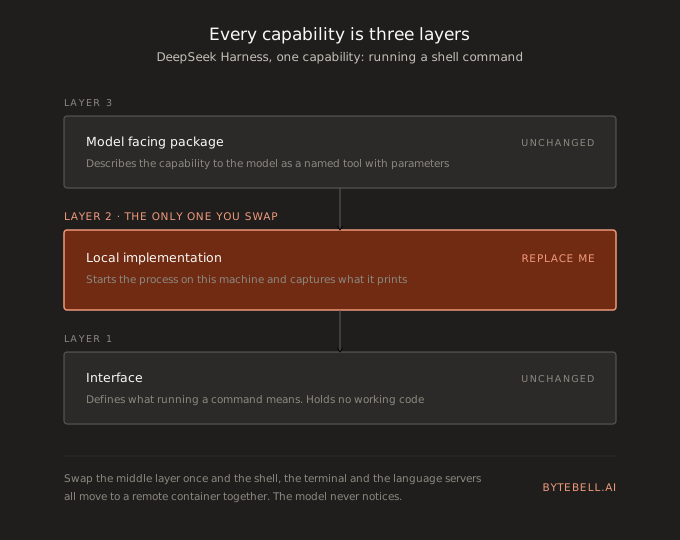
Take running a shell command. In most software that would be one component. Here it is three.
The first layer is the interface. It defines what running a command means in the abstract: you give it a command, you get back output and an exit code. It contains no working code.
The second layer is the implementation. This is the part that actually starts a process on your machine and captures what it prints.
The third layer is the model facing package. It takes the capability and describes it to the model as a tool with a name, a description and a set of parameters, so the model knows the tool exists and how to call it.
Because the layers are separate, you can replace only the middle one. Swap the local implementation for one that runs commands inside a remote container, and your shell, your terminal and your language servers all move to that container together. Nothing above or below has to change, and the model never notices.
That is the difference between a system you can genuinely reconfigure and one where you can only add things at the edges.
The four modes
The web interface ships with four preset configurations. A mode here just means a particular set of plugins loaded together.
Standard is the general purpose coding agent. File editing, shell access, web search, sub agents and workflows, which is what most people will use.
PTC keeps everything in Standard and adds Code Mode. Instead of the model calling five tools one after another and waiting for each answer, it writes a short piece of TypeScript that performs all five steps and sends that in a single run_code call. Fewer round trips, less waiting, fewer tokens spent restating context. This is a good idea and other runtimes will copy it.
Minimal exposes exactly two tools: a shell session that stays open between commands, and an editor that replaces one string with another in a file. Nothing else. It matters more than it looks, for reasons in the benchmark section below.
Creation lets the agent look at its own running plugin tree and mount or unload plugins while it is still running. The documentation compares this to changing a car engine while driving. It is included so people can experiment with agents that rebuild themselves. Treat it as a research setting rather than something to point at work you care about.
What the security defaults do
The default policy is called workspace-write. Running commands and changing files is allowed inside the directory you started in. Anything outside that directory stops and asks you first.
The more important property is that the sandbox is fail closed. A sandbox is the boundary that keeps the agent from touching things outside its allowed area. Fail closed means that if the runtime cannot confirm the boundary is actually working, it refuses to run the operation rather than continuing without protection.
The alternative, which a lot of software chooses, is fail open: if the check is inconclusive, carry on and hope. Choosing the safe default in a developer preview says something useful about the people writing it.
The session log
Every run is written to an append only log, meaning entries are added and never edited or deleted afterwards. The log holds the system prompts, the model’s reasoning traces, every tool call and its result, the scheduling of sub agents, and every piece of context that was injected along the way.
The rule stated in the documentation is that anything which reached a model request must be reconstructable from the log.
That gives you an audit trail as a property of the design rather than as something the team has to remember to maintain. Anyone who has tried to work out after the fact why an agent did something strange knows how much that is worth, and knows that adding it later never quite works.
What the benchmark numbers actually measure
DeepSeek reported the following for V4-Pro: 87.9 on Terminal Bench 2.1, 74.1 on Toolathlon-Verified, and 71.1 on DSBench-FullStack.
The model card states that the code agent tasks among those benchmarks were evaluated using the minimal mode of DeepSeek Harness as the agent framework.
Read that once more, because it changes what the numbers mean. They are not measurements of a model in isolation. They are measurements of a model operating inside a particular piece of software with a particular set of tools available to it. Give the same model a different runtime and the score moves.
Minimal mode exists partly to keep that software layer thin and consistent, so results can be reproduced. That is reasonable methodology. It also concedes, in public and in writing, that the runtime is part of the score. If you have been treating the software around a model as a thin wrapper that does not affect quality, this is the number that says otherwise.
The rough edges
Nobody else seems to be listing these, so here they are.
It is a developer preview, and the authors state plainly that changes which break compatibility are expected. That is worth taking literally rather than reading as standard caution.
The npm packaging is currently confusing. The latest tag on the bundles still points at a pre release version published before the repository went public, while current builds sit under next. If you install a bundle by hand without specifying which one, you can quietly end up with the old version and not realise it.
Installing a third party plugin goes through the launcher rather than through a package manager you run yourself. The command dsh plugin --profile <name> passes everything after it to pnpm inside that profile’s directory. It works well once you know that is what is happening, and it is not written down anywhere you would look first.
The plugin ecosystem grew faster than the software underneath it settled. The dsh-plugin topic on GitHub held hundreds of repositories within a day of launch, none of them reviewed by anyone. A plugin here can change which tools are allowed, change the system prompt, and mount itself into the interface. That is a far wider blast radius than a browser extension, so read the source of anything you mount into a profile that can reach your files.
Who this is for
If you want a finished coding assistant today, use a finished coding assistant. This is not one and does not claim to be.
It is worth your time if you want to own your agent runtime rather than rent a closed one, if you need to change the model or the sandbox by editing configuration instead of code, or if you run evaluations that need a stable minimal tool surface across many runs. The plugin tree is the real product here. The coding agent is its first customer.
This is what ByteBell builds
A runtime decides what an agent is allowed to do and keeps a record of what it did. It does not give the agent any understanding of your codebase, and that gap is still where the time goes. The agent opens files, reads them, follows imports, reads more files, and rebuilds the same picture of your system from scratch on every task, because nothing handed it that picture in advance. A better runtime makes those steps faster and traceable. It does not remove them.
ByteBell is the verifiable context layer for code, and it removes them. We run the LLM compiler pattern, which is a one time pass where a model reads every file and lowers it into a verifiable code IR that captures purpose, business context and cross repository relationships, with the file and the line kept on every claim. You pay that compile cost once, on your own infrastructure through Docker, and your code never leaves your environment. At open source model pricing it comes out to about $13 per 1,000 files.
From then on every engineer, on any copilot, queries the same representation through a single MCP url, which means the harness you run is a choice rather than a dependency. Instead of re-reading thousands of files, agents get the relevant intent plus the code back. Because the representation is verifiable, every agent edit gets checked against it before it lands, using per file SHA-256 diffing so only what actually changed gets examined again. On 46 Kubernetes ecosystem repositories and 150,000 files we measured about 10% higher accuracy at 70% lower cost, on roughly a fifth of the tokens.
A session log tells you what your agent did after the fact. A context layer is what stops it guessing in the first place. The two work well together, and neither one replaces the other.